


Game Show Style Template for Google Sheets
Original price was: $19.00.$12.00Current price is: $12.00.
Turn any lesson into a fun competition with this editable Game Show Template for Google Sheets!
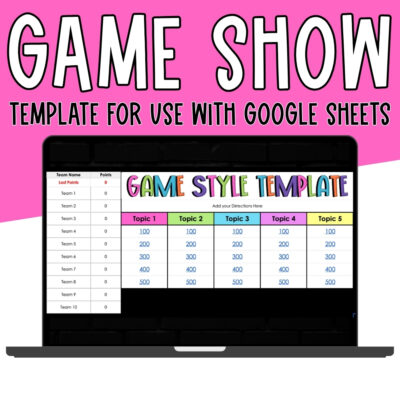
✔ Jeopardy-style game with interactive scoreboard
✔ Play with up to 10 teams
✔ Flexible scoring — award points to any team (or none!)
✔ Easy navigation with clickable links & checkboxes
✔ Fully editable — add your own categories & questions
✔ Includes step-by-step video tutorial + written directions
Bring the thrill of a game show into your classroom with this interactive Jeopardy-style Game Show Template for Google Sheets! Whether you’re reviewing for a test, practicing vocabulary, or adding some fun competition to your lessons, this editable template makes learning exciting and low-prep.
Students play in teams and take turns choosing questions from the interactive board. With each correct answer, points are awarded, and the competition heats up as teams race to the top of the scoreboard. The flexible format allows you to play with up to 10 teams, and you can easily adapt the template for any grade level or subject area.
How it Works:
-
Teachers enter team names (up to 10) on the main scoreboard.
-
Students pick a question by clicking the linked point value on the game board.
-
After a team answers, reveal the correct answer with a simple checkbox.
-
Use the drop-down menu to assign points to the correct team — or no team at all!
-
Navigate back to the board with a single click and continue playing until all tiles are used. 🏆
The template is fully editable. Just type in your own questions, answers, and categories, and adjust the fonts, colors, and layout to fit your classroom theme. With both written directions and a step-by-step video tutorial included, setup is quick and teacher-friendly.
Why Teachers Love It:
✔ Jeopardy-style review game in Google Sheets
✔ Supports up to 10 teams with scoreboard tracking
✔ Flexible scoring — assign points to any team (or none!)
✔ Easy navigation with clickable links & checkboxes
✔ Editable with your own categories, questions, and answers
✔ Includes video tutorial + written setup guide
📌This template is for use with GOOGLE SHEETS ONLY and is not compatible with Microsoft Excel.
If you want to check out the PowerPoint version, CLICK HERE.
What do I need to use this template?
All you need is a Google account and a browser. This template was built for Google Sheets and runs right in Chrome, with both written directions and a step-by-step video tutorial included. It is not compatible with Microsoft Excel.
Will this work on Chromebooks?
Yes — Chromebooks and Google Sheets are a perfect match! Students just sign into their Google account and start playing.
Can I add my own questions?
Yes. The template is fully editable — just type in your own questions, answers, and categories, and adjust the fonts, colors, and layout to fit your classroom theme. It supports up to 10 teams on the scoreboard.
Can I use this with Google Classroom or while screen-sharing on Zoom?
Yes. To share with Google Classroom, simply post the share link so students can open the game. For Zoom, share your screen and play it together as a class.
Am I allowed to sell resources I make with this template?
Yes, with a couple of kind requests. The terms of use allow you to create and sell your own resources using the template, as long as they include an educational component and are not sold in the same format the templates are sold in. The templates themselves may not be resold or claimed as your own. Your purchase is for your individual use, and please include the logos on your credit page.
Only logged in customers who have purchased this product may leave a review.


Reviews
There are no reviews yet.